
Appearance
Catalogue review
In short
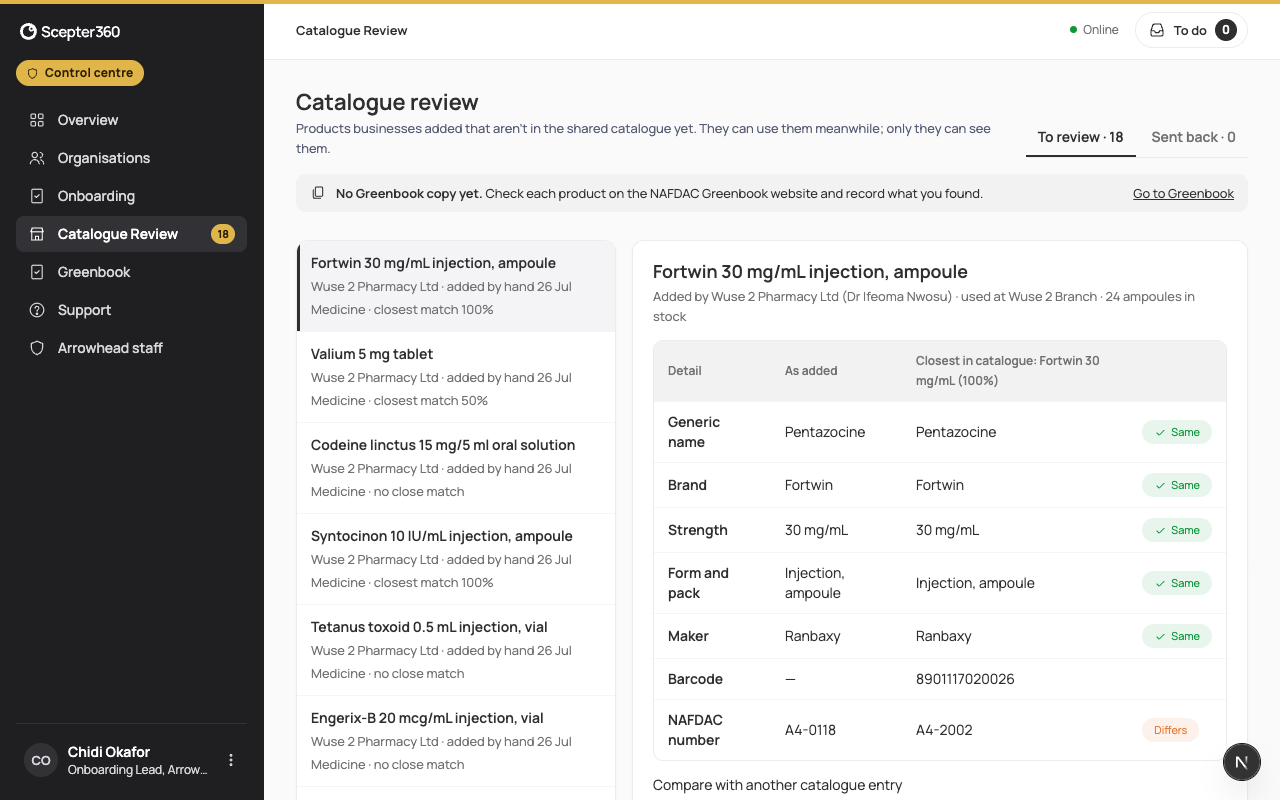
Products a business adds itself come here. Check each against the NAFDAC Greenbook, then link it to the catalogue product it's the same as, add it as new, or send it back to the business to correct.
Who: the onboarding team.
- Open Catalogue Review. To review lists what's waiting (the menu shows how many).
- Choose a product to compare it. The table puts three versions side by side: what the business typed (As added), NAFDAC's record (Greenbook), and the nearest product we already have (Closest in catalogue). Look for rows marked Differs: a different strength or NAFDAC number usually means a typing mistake; a matching barcode or NAFDAC number usually means it's a product we already have.
- Record the NAFDAC check. If our Greenbook copy has the number, it's filled in for you; you still make the call, and your name goes on it.
- Then choose. The sentence beside the buttons says what the comparison suggests.
- Same as …: link it to that catalogue product; the business's stock and prices stay as they are (Compare with another catalogue entry to pick a different one).
- Add to catalogue as new: a genuine product with nothing close in the catalogue.
- Send back…: say what the business should correct.
Not found on the Greenbook? Most are typing slips, so usually Send back to check the pack. Report suspected fake… only if the pack itself looks wrong: the business's superintendent gets an urgent to-do to check the stock.
Sent back lists what's waiting for the business to correct.
If something goes wrong
- "Record the NAFDAC check first."
- "Someone has already reviewed this product. Close and refresh the list."