
Appearance
Arrowhead staff and unlocking
In short
Arrowhead staff lists everyone who can sign in to the control centre. If a colleague is locked out after 5 wrong attempts, an admin unlocks them, after checking it's really them.
Who: everyone can look; only admins (the onboarding team) unlock, and never themselves.
The list
Use it to see who is locked out. Each person shows Active, Locked or Never signed in, and their last activity.
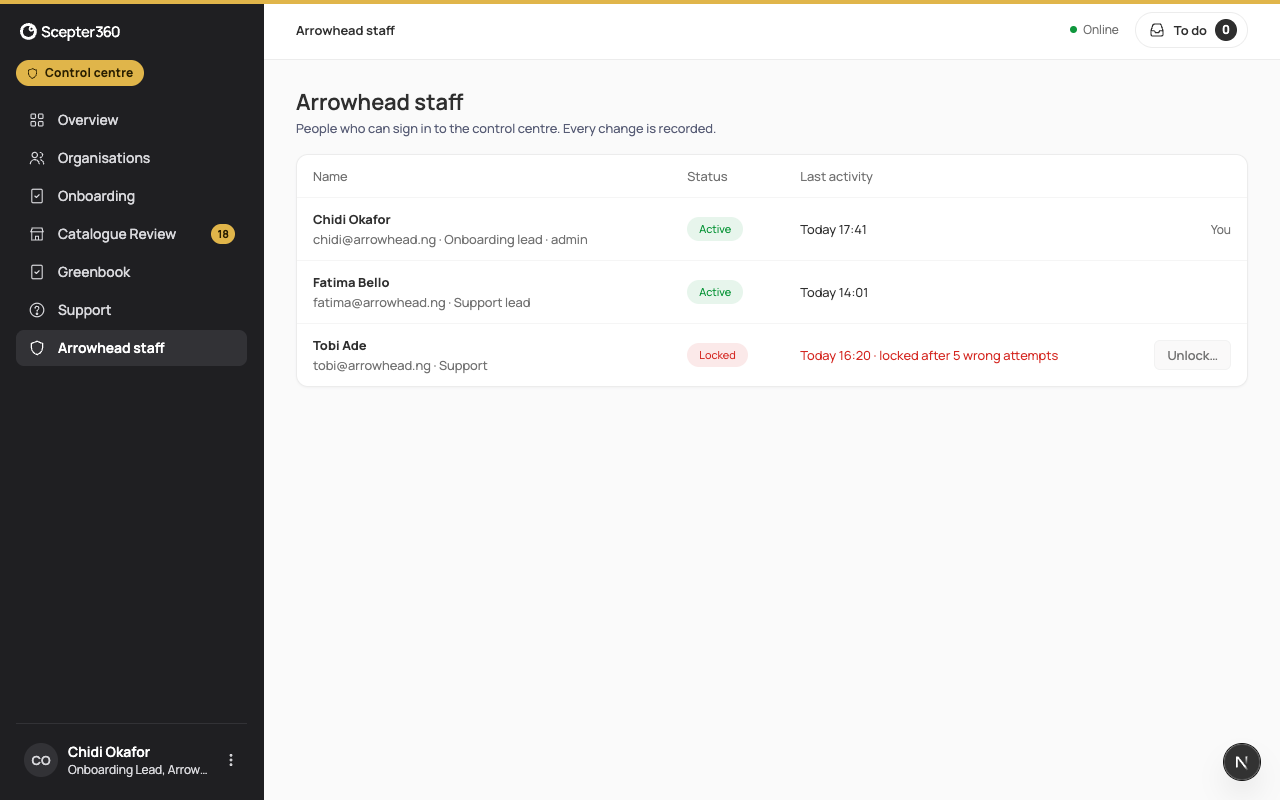
Unlock a colleague
- Choose Unlock… next to them.
- Read when and why it locked, and where the last attempt came from. If they didn't try to sign in, don't unlock: report it. Wrong attempts they didn't make usually mean someone else is trying their account.
- Tick that you checked it's them in person, or on a video call showing their face and Arrowhead ID card. A phone call or message alone isn't enough.
- Type the Reason and Your two-step code.
- Choose Unlock.
They get an email saying you unlocked them, and it's recorded with your name.
If something goes wrong
- "That code didn’t work. … attempts left before your own account locks."
- "…’s account isn’t locked: someone may have unlocked it already."