
Appearance
Check licences
In short
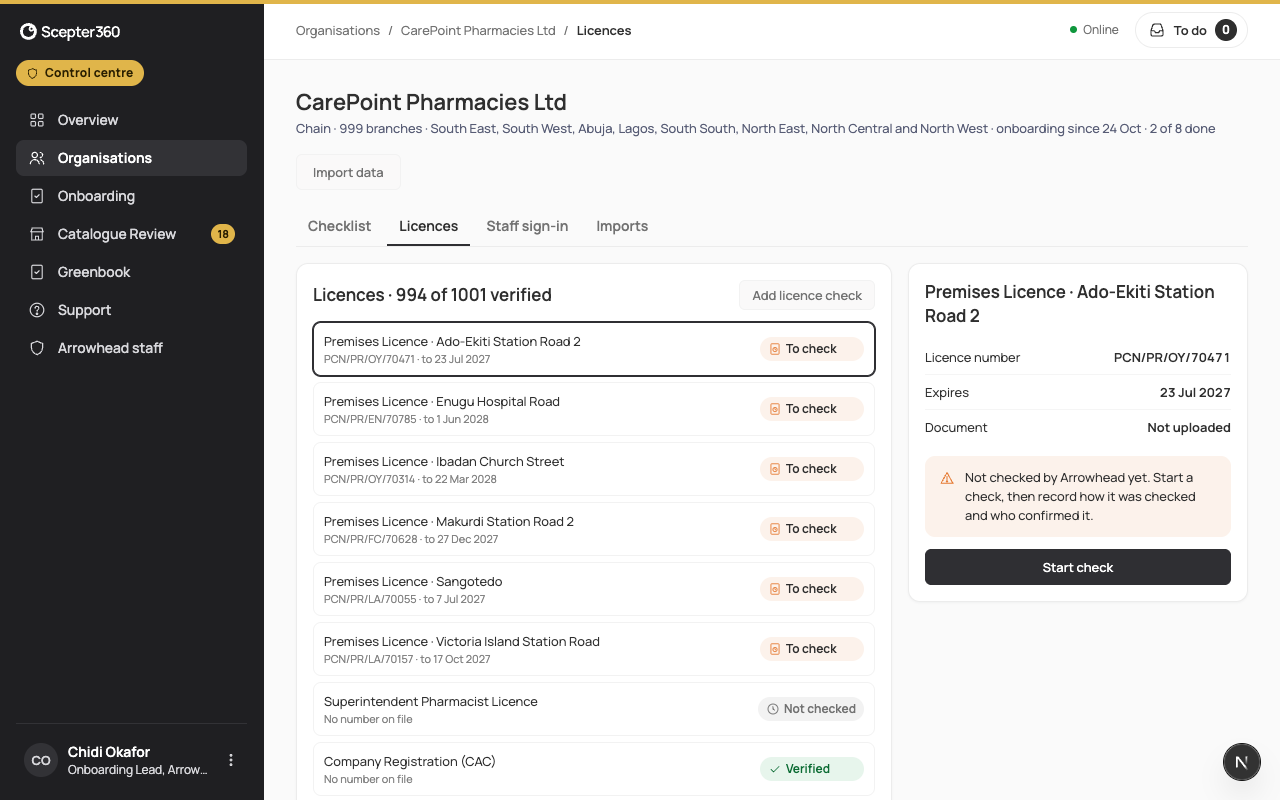
Before a branch goes live, Arrowhead checks the business's CAC certificate, the superintendent's PCN licence and each premises licence: open the uploaded copy, check it on the register (or by phone), record who confirmed it, and Mark Verified.
Who: the onboarding team.
- On the business, open Licences. Start with those marked To check or Not checked.
- Choose a licence and Start check (or Add licence check for one that isn't listed). Type the details from the licence, choose the Uploaded copy, and choose Add.
- Open the copy and compare it: the name, number, address and expiry date should match what you typed and what the register says.
- Choose How it was checked: Online register, Phone call to the office or In person, and Confirmed by (the officer, office, date and time of the call).
- Choose Mark Verified, or Reject with why (the business is asked for another copy). Verify only when the register or the office confirmed it; a blurred copy or a name that doesn't match is usually a reason to reject. Mark Verified stays off until Confirmed by is filled in.
If the PCN online check finds no match, call the state PCN office and record who confirmed it.
When the business replaces a verified licence, the new copy needs checking before the branch can go live: Check the new copy.
If something goes wrong
- "The business hasn’t uploaded this licence yet: ask them to, in Business Details."
- "This licence has already expired: ask the business for the renewed one."
- "The superintendent hasn’t accepted their invite yet."