
Appearance
The overview
In short
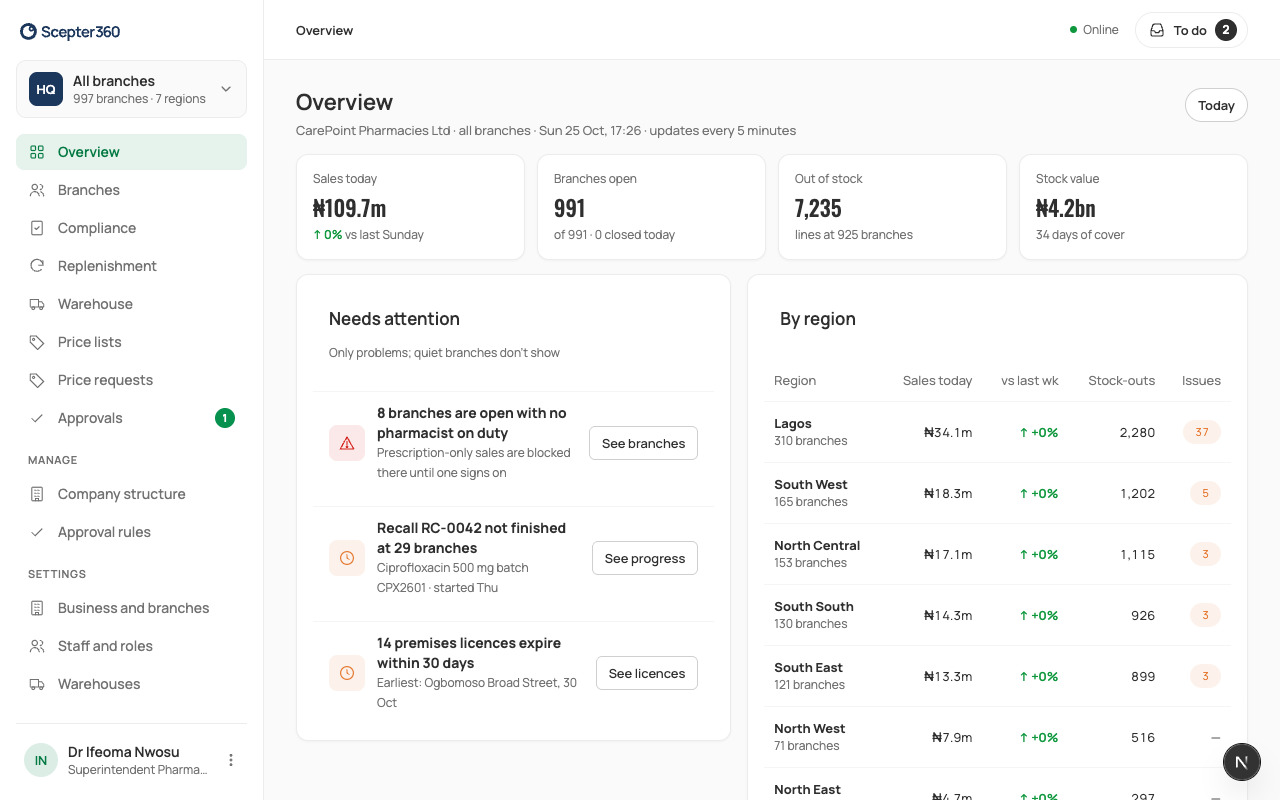
Overview shows today across all your branches: sales, branches open, stock-outs, stock value, and only the problems that need someone. Open a region, then an area, then a branch.
Who: the owner and head office (every branch); regional managers (their region). Area managers have their own area home.
Read it
Open Overview to see how the business is doing today and where someone is needed. It updates every 5 minutes.
- Sales today, compared with the same day last week.
- Branches open, and how many are closed today.
- Out of stock: lines out, at how many branches.
- Stock value at cost, and how many days it covers.
Start with Needs attention: no pharmacist on duty, fridge alarms, an open recall, licences, late controlled-drug counts. Each has a button to see it. Quiet branches don't show, so a short list is good news.
By region lists each region's sales, stock-outs and issues. Open a region to see its areas, an area to see its branches, and a branch to see its day.
If you're offline, you see the figures this device last had, and nothing can be changed.
Change what you're looking at
The card at the top of the menu shows what you're looking at: All branches, a region, an area, or one branch. Choose it (or press / anywhere) and search by branch, area, code or town. Picking a branch where you work opens that branch; picking one where you don't opens it read-only (Find and open a branch).
Without areas
A business with several branches but no areas sees All branches: the same figures, and every branch in one table, problems first. Choose a branch to switch to it.