
Appearance
Schedule a price change
In short
Choose the products and lists, type the new prices, pick the day they start, and say why. The change happens before opening that day, never mid-sale, and each branch is told which shelf labels to swap. A change of more than 10% needs the owner's approval.
Who: the owner and buyers (with permission to manage prices).
- On Price lists, choose Schedule a price change.
- Add a product for each one, and type its New price. The change shows as a percentage.
- Tick the Price lists it applies to. The first list's change sets the others by the same percentage (rounded to ₦10), unless you type their price too.
- Starts: tomorrow or later.
- Branch overrides: Keep, if still within 10% ends only the branch prices more than 10% from the new price; End them all puts every branch on the new price.
- Why (shown to branches).
- Check the summary: how many branches it affects, and anything that needs approval.
- Choose Schedule, or Send for approval if a price moves more than 10%. A move that big is worth checking for a typing slip first.
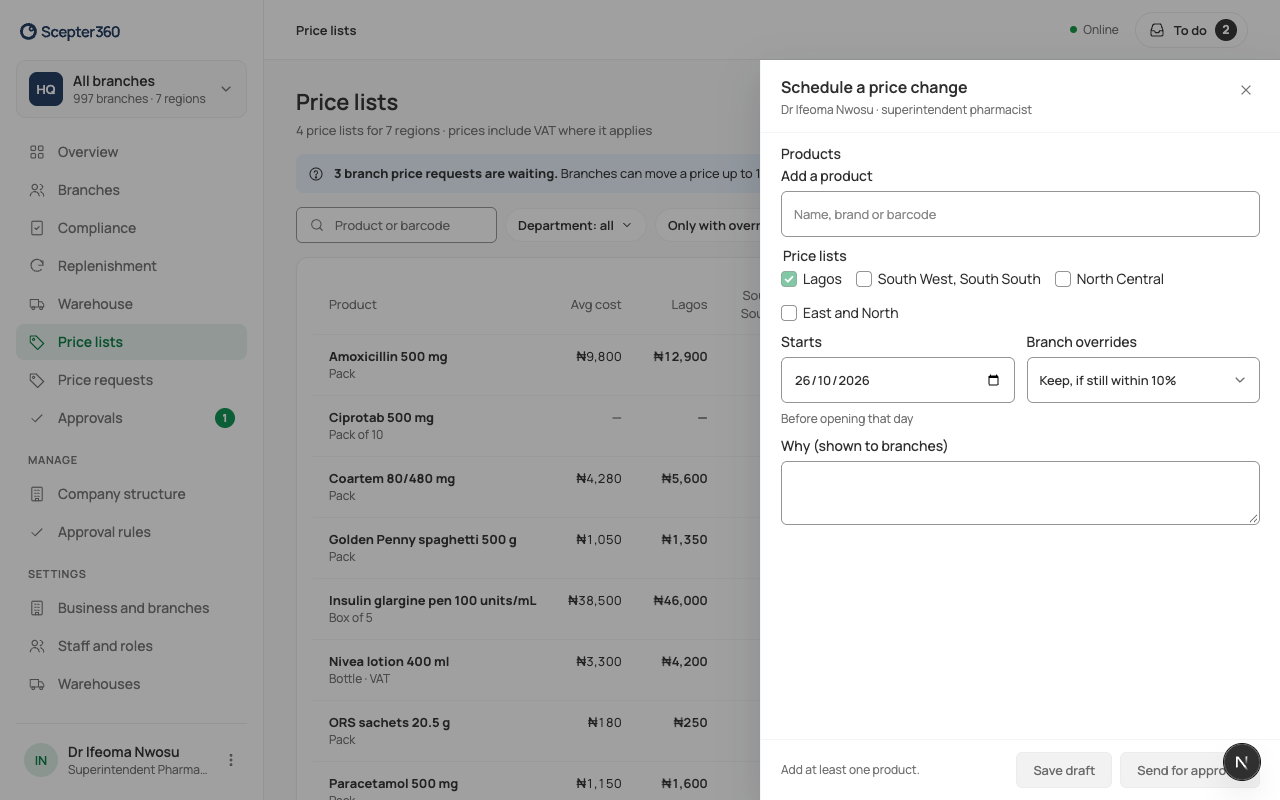
Save draft keeps it for later. On the start day, tills switch before opening, and every branch gets "New prices today: swap … shelf labels".
If something goes wrong
- "Choose tomorrow or a later day: prices change before opening."
- "Say why: branches see it."