
Appearance
Approval rules
In short
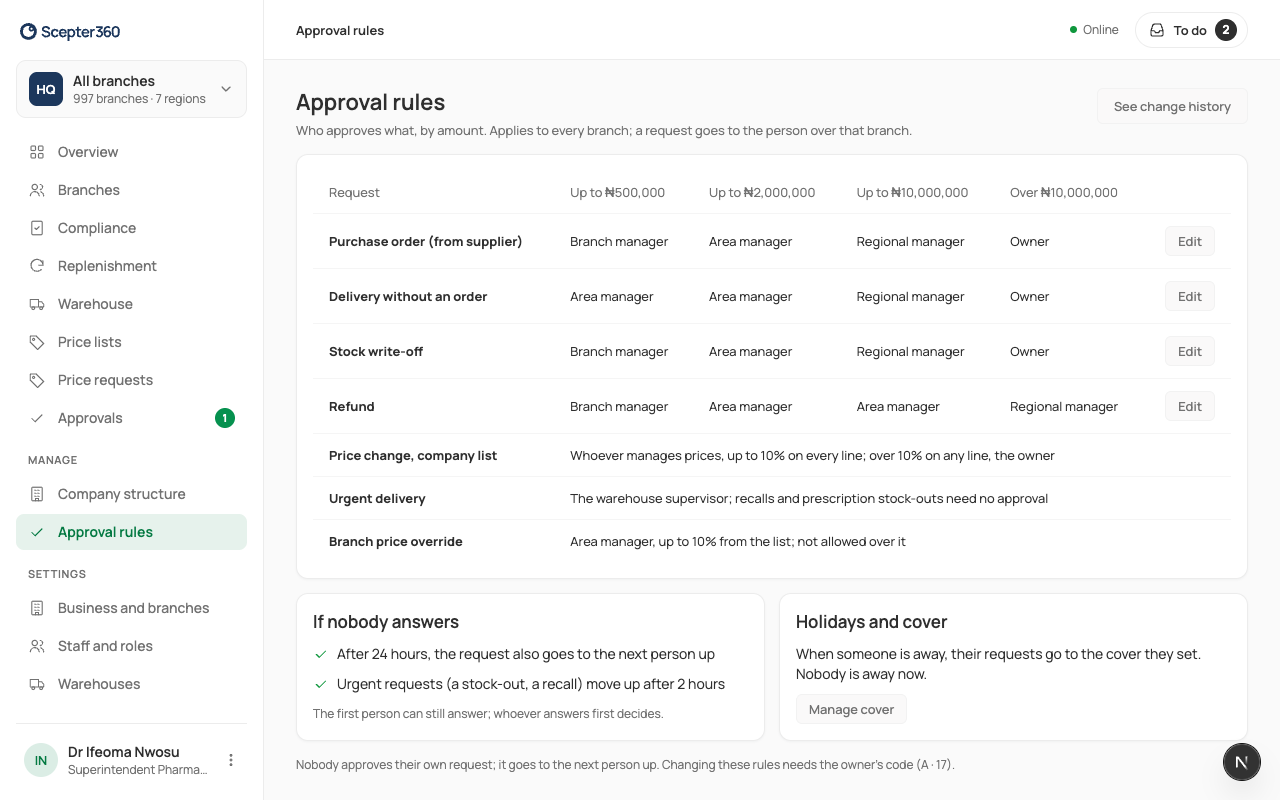
Approval rules says who approves each kind of request, by amount: branch manager, area manager, regional manager or owner. A request goes to that person over the branch, and moves up if nobody answers.
Who: the owner changes them (with their two-step code); managers can look.
Read them
Open Approval rules to see where a request will go before anyone raises it. Each row is a kind of request (purchase order, stock adjustment, and so on), each column an amount band, and the cell says who approves.
- If nobody answers: after 24 hours the request also goes to the next person up (2 hours for urgent ones, like a stock-out or recall). Whoever answers first decides.
- Holidays and cover: when someone is away, their requests go to their cover. Manage cover opens Company structure.
- Nobody approves their own request.
Change a rule
A more senior role on a band usually means slower answers for branches; a more junior one means less oversight of bigger amounts.
- Choose Edit on the row.
- Pick the role for each amount, and say why (for the history).
- Choose Continue, type the 6-digit code from your authenticator app, and Confirm and save.
New requests follow the change; ones already raised keep their route. See change history shows every change, who made it and why.
If something goes wrong
- "A bigger amount can’t go to a more junior role than a smaller one."
- "That code didn’t work. … attempts left."
Deciding a request
Requests from a branch reach you in Approvals, with the branch and its area, and the approval chain. For an order, you also see what the branch has spent this month against the area's average, and how long the product would last now. Spending well above the average, or stock that would already last a long time, is usually worth a question before you approve.