
Appearance
Run replenishment
In short
Before each delivery, Start the run: every branch gets a suggested order to check. When orders close, Create transfer orders, and the warehouse starts picking.
Who: the warehouse supervisor, the central buyer and the owner.
Start the run
Open Replenishment. It shows the next delivery and when orders close. Choose Start the run: each branch due a delivery gets its suggestion (from its last 30 days of sales, to last until the next delivery plus a few days) and a to-do to check it.
Watch it
While branches check, this screen shows what the run will send. Look at how many branches have checked, and where the warehouse is short. The table lists each branch: Suggested, Checked by branch, Changed by branch, or Urgent. Branches that don't check keep the suggestion.
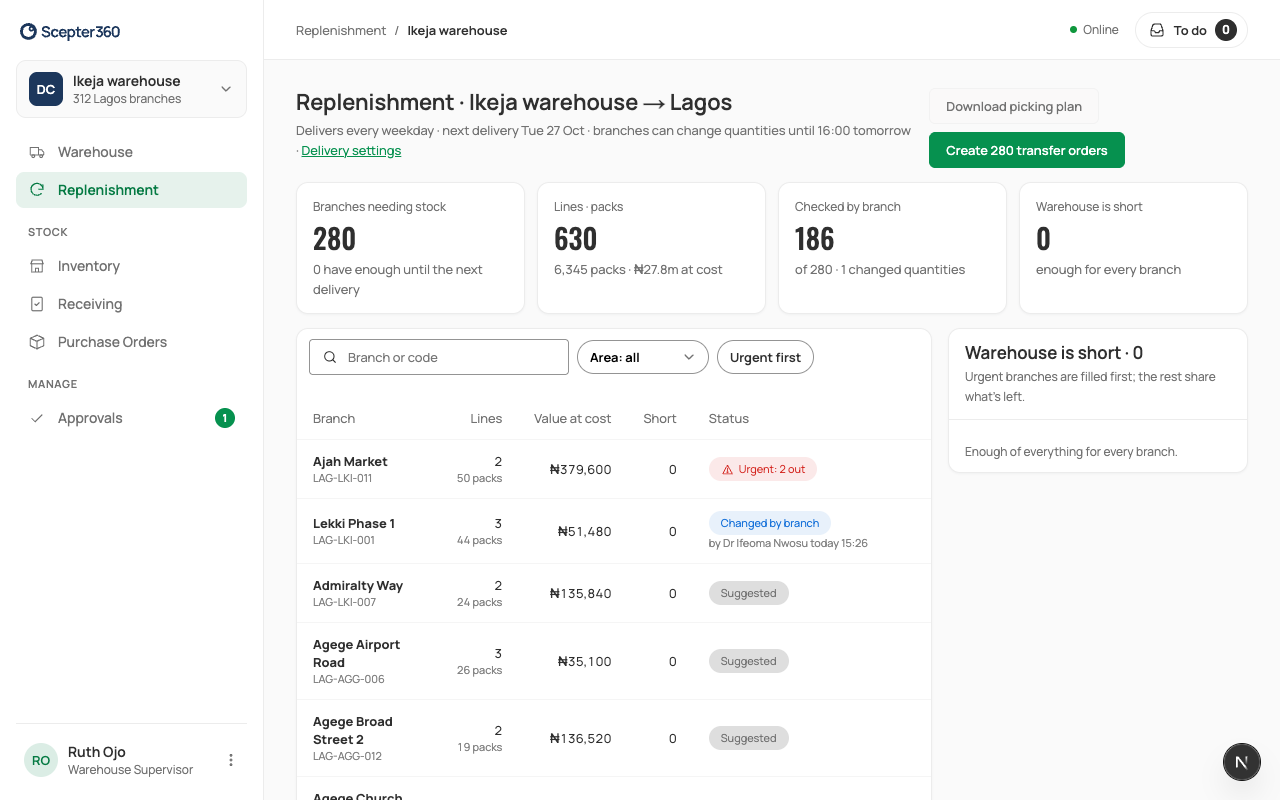
When the warehouse is short, urgent branches are filled first and the rest share what's left. Each short product shows how many are needed and how many are in stock, so you can see how big the gap is.
Make the transfer orders
After orders close, choose Create … transfer orders: one per branch. Then Open the warehouse board to pick (Pick, check and send).
Download picking plan gives the run as a spreadsheet, product by product, with where to pick from.
If something goes wrong
- "No delivery is due: check the delivery settings."
- "The transfer orders for this run are made already."