
Appearance
Close your shift
In short
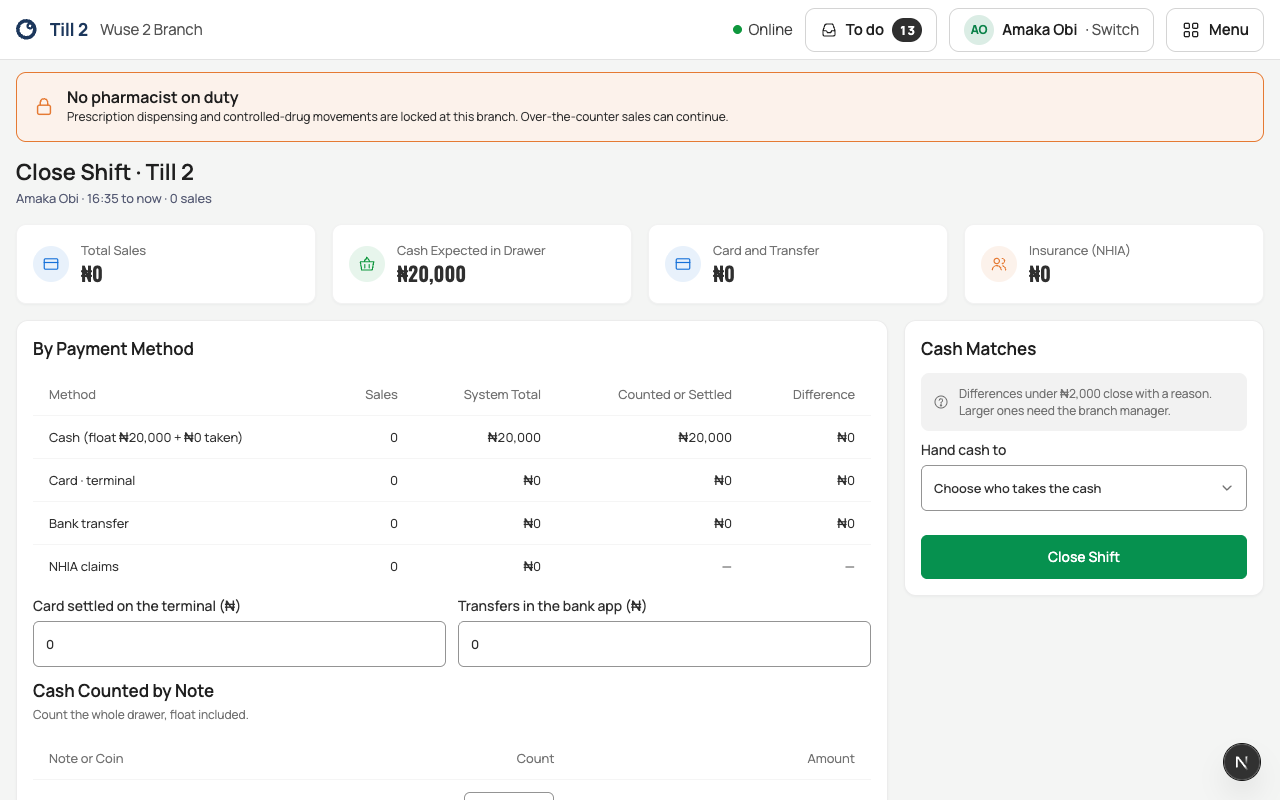
At the end of your shift, open Close shift from the sale screen, count the whole drawer, enter the card and transfer totals, and choose Close Shift. A difference over ₦2,000 needs your manager.
Who: the person who opened the shift, or a manager. Closing needs internet.
Close the till
- On the sale screen, choose Close shift (at the foot of the sale).
- The totals at the top are what the till expects; Cash Expected in Drawer is the one your count is checked against.
- Type Card settled on the terminal (₦) from the card terminal's end-of-day slip, and Transfers in the bank app (₦).
- Under Cash Counted by Note, count the whole drawer, float included.
- The panel on the right compares your count with what the till expects: Cash Matches, or Cash Short / Cash Over by how much. A small difference is usually change given wrongly; recount once before typing a Reason.
- If you hand the cash to someone, choose them under Hand cash to, so it's clear who holds it.
- Choose Close Shift.
When the difference is over ₦2,000
The button changes to Ask a Manager to Approve and Close. Your manager picks their name and types their PIN on your till. See Give a discount for how manager approval works.
If something goes wrong
- "Say why the cash is short before closing." (or over) Type what happened.
- "The till’s figures changed since you opened this screen: …" A sale finished while you were counting. Check your count against the new figures, then close.
- "Only the cashier who opened this shift, or a manager, can close it." If the person who opened it has gone, take over the till instead.
- "You’re offline. Closing a shift needs a connection." Wait for the internet.