
Appearance
Sell at the counter
In short
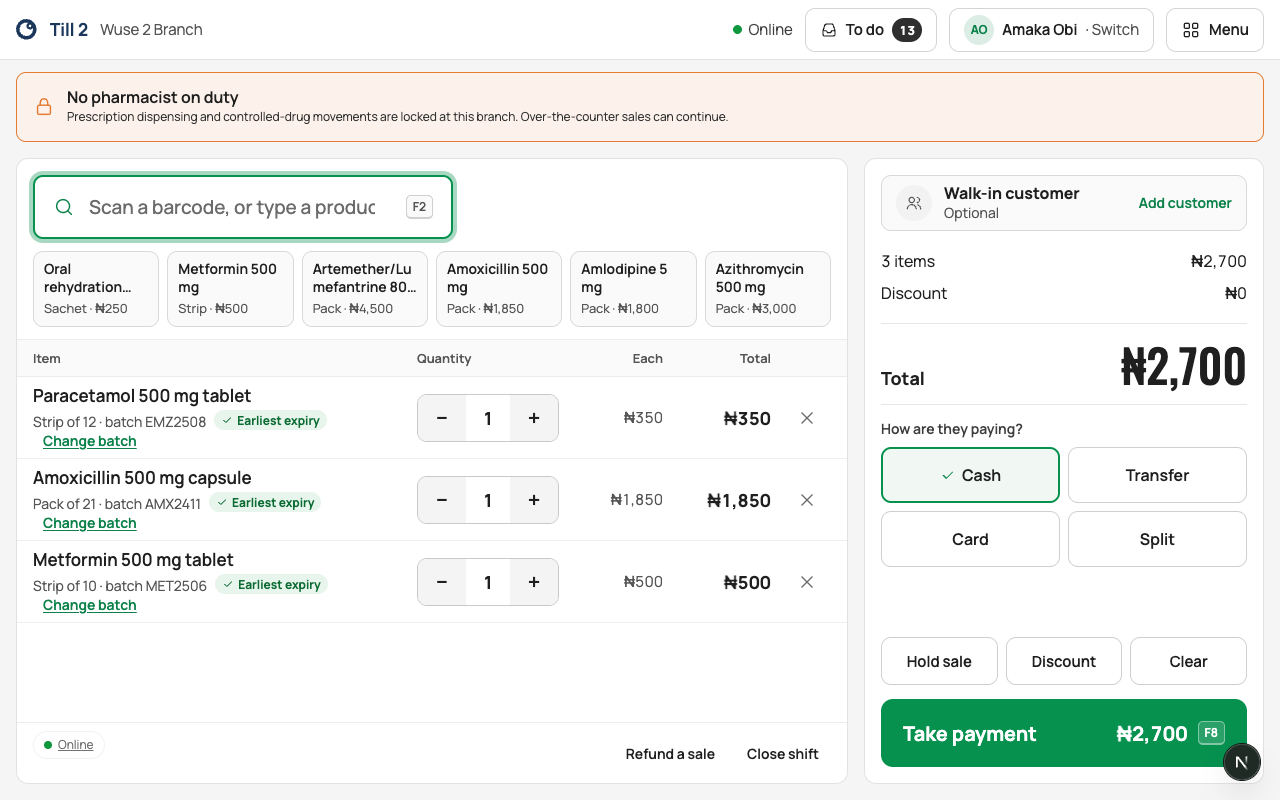
Scan each item (or type its name), check the quantities, and choose Take payment. Add the customer if they're a patient. That's a sale.
Who: anyone who sells, on a till with an open shift (open your shift first).
Add items
- Scan the barcode. Or type at least 2 letters of the name in Scan a barcode, or type a product name and choose the product. (Press F2 to jump back to the box.)
- Each scan adds one. Use + and − to change the quantity; going below 1 removes the line. × removes it too.
- Tiles above the sale add the items you sell most in one tap.
In the search, check how many are here ("12 here", or "None here") before you promise an item.
The till sells the smallest pack that has a price (a strip, say, rather than the box).
Batches
Each line uses the batch that expires first, so older stock sells before it expires. Change it only when there's a reason, such as a damaged pack. Choose Change batch, pick a reason (for example "Customer asked for a longer expiry"), and choose Use Batch …. Every batch change is recorded with your name.
Add the customer
A customer is optional. Choose Add customer, search Name, patient ID or phone, and pick them; ask them to confirm their date of birth, because two patients can share a name. Or choose Walk-in Customer.
Hold a sale, or clear it
- Hold sale puts it aside, for example while the customer fetches money. Any till at the branch can pick it up from Held sales. Holding needs internet.
- Clear empties the sale, after you confirm Clear Sale.
A barcode Scepter360 doesn't know
You see We don’t know this barcode. For everyday items (not medicines), type the Product name, as on the pack, its department and Price, then a manager approves the price with their PIN. The item is added to the sale, and a to-do reminds someone to finish its details. Medicines can't be added this way: a pharmacist adds them in full. Needs internet.
Then
Choose Take payment (or press F8): Take payment and give a receipt.
If something goes wrong
- "… needs a prescription": controlled drugs are dispensed from the Prescriptions queue, with a witness. Call the pharmacist.
- "… has no price": a pharmacist or manager sets the price in Inventory.
- "… is out of stock here": check other branches in Inventory.
- "No product matches …": check the spelling, or scan the barcode.