
Appearance
Give a discount
In short
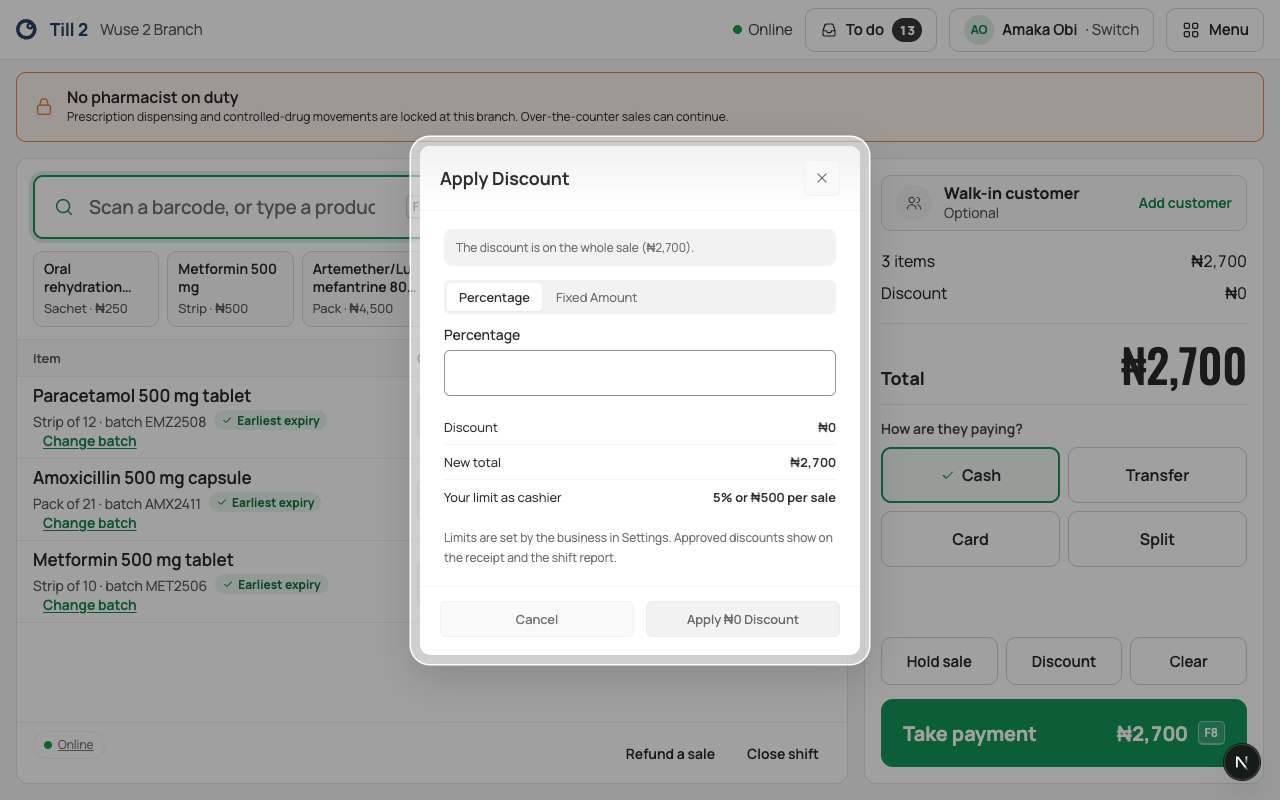
Choose Discount, enter a percentage or an amount, and apply it. Up to your limit (5% or ₦500 a sale for counter staff) you do it yourself; above it, a manager approves with their PIN.
Who: cashiers, pharmacists and technicians, up to 5% or ₦500 per sale (both must be met: 10% off a ₦4,000 sale is only ₦400, but it's over 5%). Your owner can change limits on Settings › Roles.
Give a discount
- With items in the sale, choose Discount.
- Choose Percentage or Fixed Amount, and type it.
- Check New total with the customer, and Your limit.
- Choose Apply ₦… Discount. It shows on the receipt and the shift report.
To take it off, open Discount again and choose Remove Discount.
When a manager must approve
Above your limit the dialog says "This is above your limit. A manager must approve it with their PIN."
- Choose Ask a Manager to Approve.
- The manager picks their name under Who is approving and types their PIN on your till. You stay signed in.
- They choose Approve ₦….
From ₦50,000 the manager also types the code from their authenticator app. An approval lasts 2 minutes and works once.
If something goes wrong
- "That PIN isn’t right. … tries left before it locks." The manager types it again.
- "₦… is over what this person can approve." Ask someone with a higher limit, for example the owner.
- "The manager’s approval for the discount has expired. Go back and apply the discount again." More than 2 minutes passed before payment.
- A held sale's discount above your limit is approved again when you take payment.