
Appearance
Pick, label and check
In short
Scan each pack as you pick it, print the labels, then the pharmacist does the final check with their PIN.
Who: pharmacists and technicians pick and label; the final check is a pharmacist's.
Pick
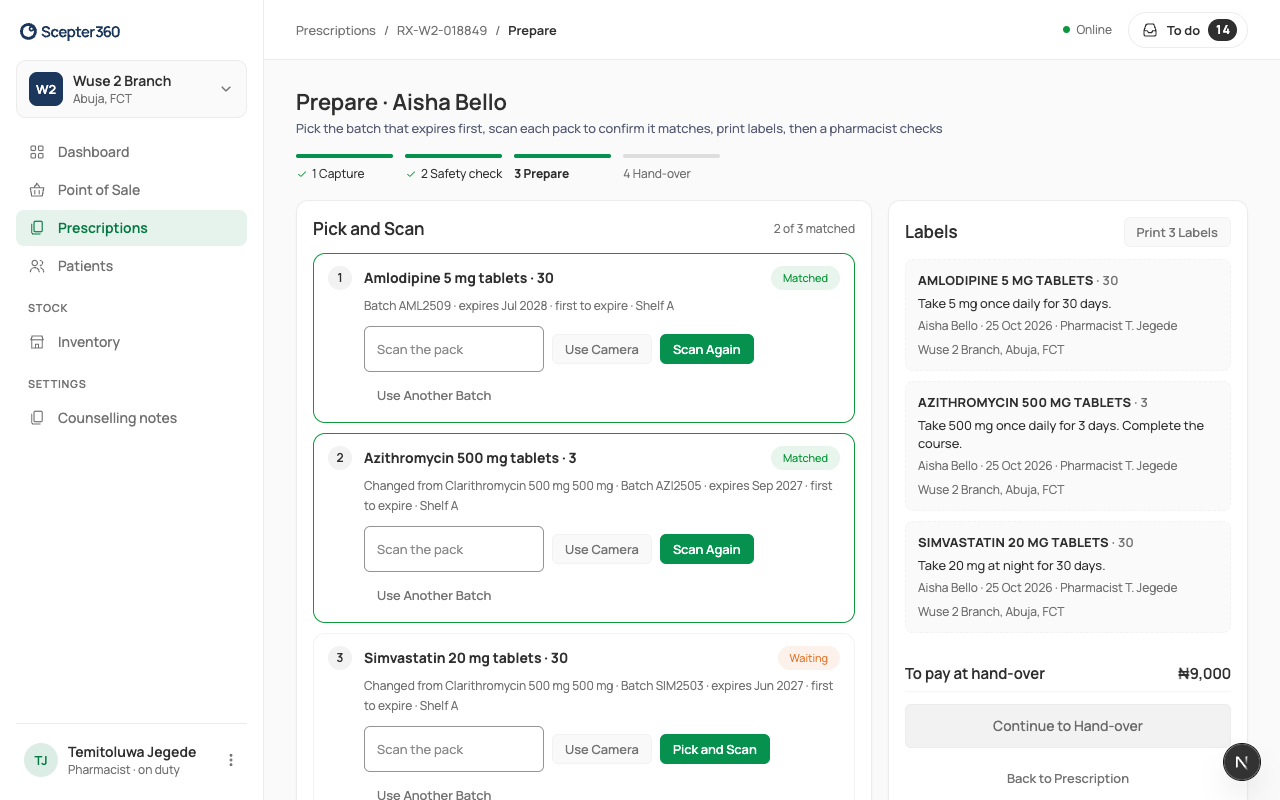
- Open the prescription and choose Prepare.
- Each medicine shows the batch to pick (the one that expires first) and its shelf. Pick it, and scan the pack in Scan the pack (or Use Camera, or Pick and Scan). It turns Matched; a wrong pack shows Mismatch: "Wrong product scanned." A mismatch blocks the dispense. It's usually a look-alike pack or the wrong strength: put it back and pick again.
- To use a different batch, choose Use Another Batch and why (damaged, expires before the course ends, recalled, or other). The reason is saved with your name.
Not enough stock: part-fill
Choose Part-fill, type what you Give now, and choose how the patient gets the rest. The patient pays now only for what they get.
- Collect here when stock arrives: the balance is shown as owed, and the patient gets an SMS when it's ready (if they agreed to SMS). When it's in, open the prescription and choose Hand Over … Balance.
- Cancel the balance: the prescription closes as part-filled. Usually when the patient doesn't want to wait.
Labels and final check
- Choose Print … Labels.
- The pharmacist chooses Confirm Check With PIN, types their PIN, and chooses Confirm Check.
- Choose Continue to Hand-over.