
Appearance
Run the safety checks
In short
Scepter360 checks each prescription for interactions, allergies and doses. Resolve or override every severe or moderate warning, then choose Continue to Prepare.
Who: pharmacists on duty. Technicians can look, but not change anything.
Run them
- Open the prescription from the queue and choose Run safety checks (or Resolve checks).
- Each warning shows how serious it is: Severe, Moderate or Minor. Minor notes don't block; their counselling point is added to the hand-over.
- Deal with each severe or moderate warning:
- Change Medication (recommended): change it with the prescriber's agreement, and say Who agreed, and how. The checks run again.
- Override With Reason: dispense as written, and record why. This is usually for a combination the prescriber chose on purpose, for example one they're monitoring.
- When nothing is left blocking, choose Continue to Prepare.
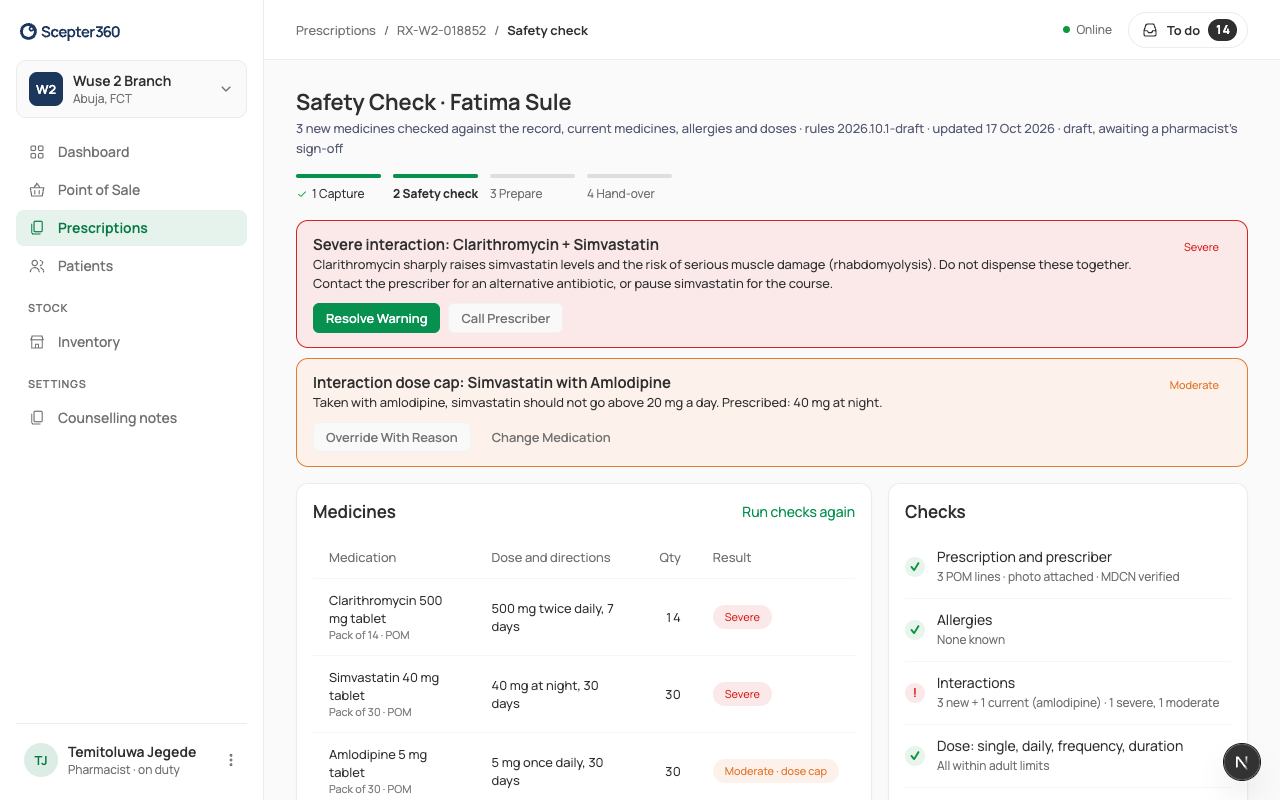
Dispensing stays blocked until every severe or moderate warning is resolved or overridden.
Overriding a severe warning
A severe warning needs a second pharmacist: choose them, and they type their PIN on this device. Then Confirm Override.
A child's dose
If the weight is missing or old, the check asks for it: Record Weight, then Run Again.
Cancel a prescription
On the prescription, a pharmacist can cancel it, giving Why is it being cancelled?.