
Appearance
Refund a sale
In short
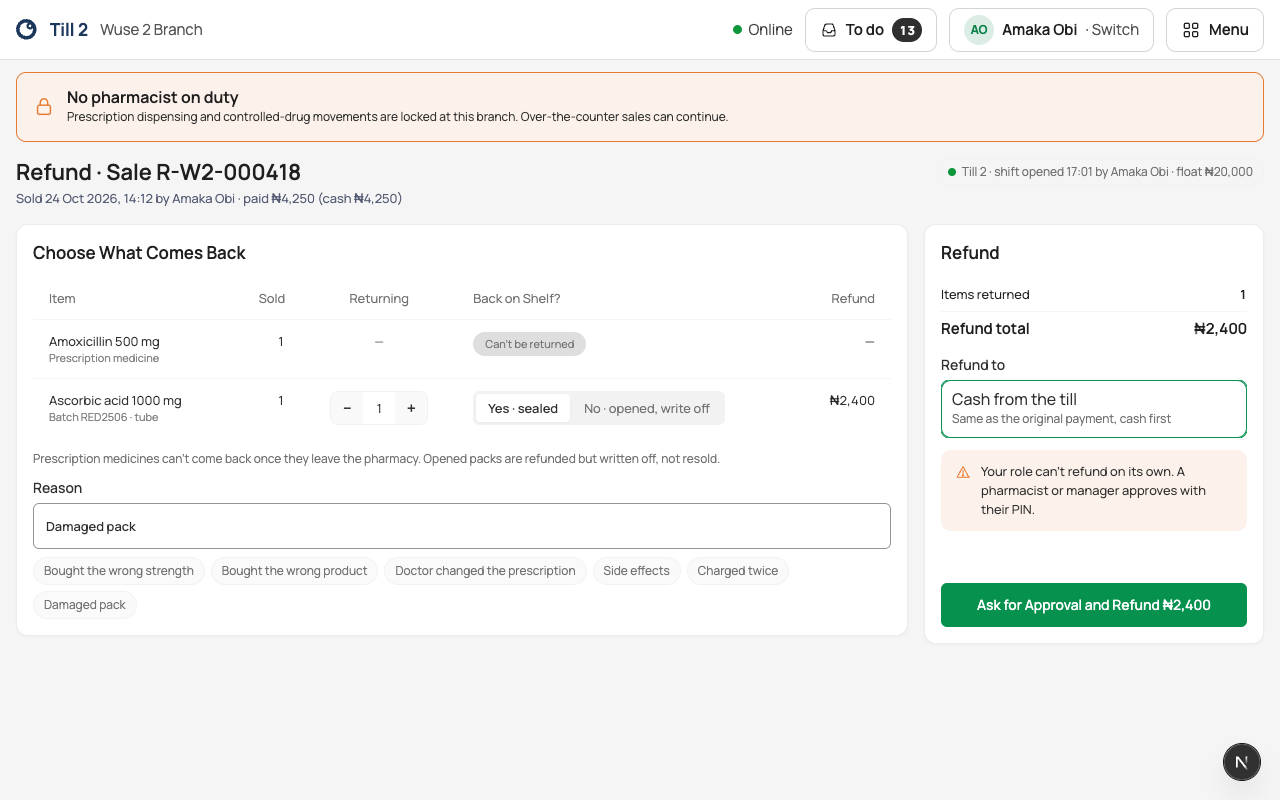
Find the sale by its receipt number, choose what comes back and why, and how the money goes back. Cashiers always need a pharmacist or manager to approve; pharmacists can refund up to ₦10,000 on their own.
Who: anyone who sells, at the branch that made the sale. Needs internet.
- Cashiers need an approver for every refund.
- Pharmacists refund up to ₦10,000 on their own.
- Prescription medicines can't be returned.
Refund
- On the sale screen, choose Refund a sale.
- Type the Receipt number (for example R-W2-000418) and choose Find Sale, or pick it from Today’s Sales.
- For each item coming back, set Returning, and Back on Shelf?: Yes · sealed if it can be sold again, or No · opened, write off. If the seal is broken or you're not sure how it was stored, write it off: the customer is still refunded.
- Type the Reason.
- Choose Refund to. Only the ways the customer paid are offered: Cash from the till, Back to the card (reverse it on the terminal) or Bank transfer (to the account that paid).
- Choose Refund ₦…, or, when it needs approval, Ask for Approval and Refund ₦…: the pharmacist or manager picks their name and types their PIN.
You see Refunded ₦… with its number, and what to do: give the cash from the drawer, or send the transfer from the business account and keep the reference.
If something goes wrong
- "Choose what comes back." Set at least one Returning.
- "Say why it’s being refunded."
- "Refund a sale at the branch that sold it." Send the customer to that branch.
- "Only … of … can still be refunded." Part of it was refunded already.
- A line marked Can’t be returned is a prescription medicine.