
Appearance
Unlock a till with your PIN
In short
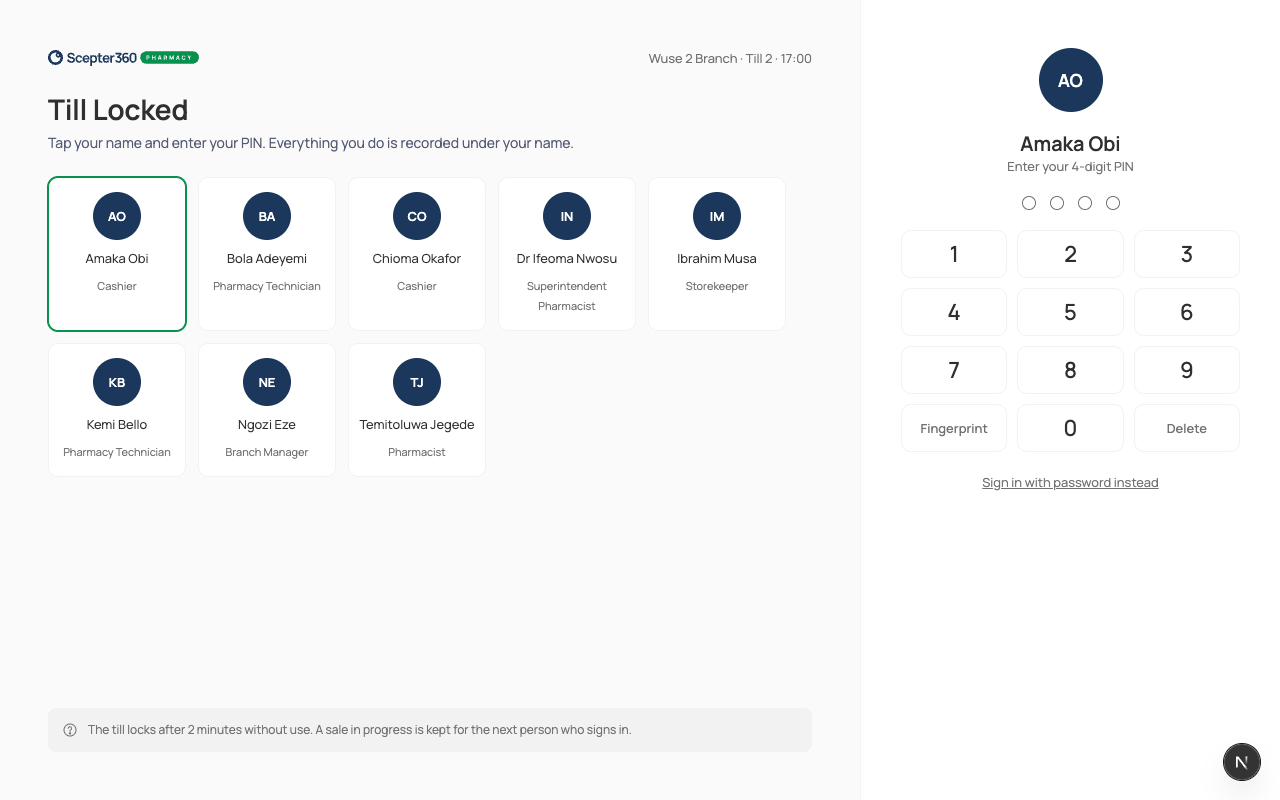
A till locks after 2 minutes without use. Tap your name, type your 4-digit PIN, and carry on. Whatever you do is recorded under your name.
Who: everyone who works at the till's branch.
Unlock the till
- On Till Locked, tap your name.
- Type your PIN on the keypad (or the keyboard). The fourth digit unlocks it.
If you were the last person on the till, you go back to where you were. A sale someone had started is kept for the next person.
Hand the till to someone else
When you step away and a colleague takes over, don't log out:
- On the sale screen, tap your name at the top (Switch), or
- in the menu, choose Switch user.
The till locks, and your colleague unlocks it with their own PIN, so their sales are recorded under their name, not yours.
If something goes wrong
- "That PIN isn’t right. Try again." Type it again slowly.
- "Too many attempts. Try again later." After 5 wrong PINs your PIN is locked for 15 minutes. Your manager is told. Wait, or sign in with your password (Sign in with password instead).
- "… hasn’t signed in on this tablet while online in the last 7 days, so can’t sign in offline." With no internet, only people who've used this till recently can unlock it. Wait for the connection to come back.
- Your name isn't on the screen: you don't work at this branch yet. Ask your manager.