
Appearance
Hand over to the patient
In short
Check who's collecting, counsel them, take payment (here or at the till), and sign off with your PIN. Controlled drugs also need a witness.
Who: pharmacists on duty.
1. Confirm identity
- Under Who is collecting, choose Patient or Someone Else (then their name and relationship).
- Type the Patient’s name and Date of birth as they tell you, and choose Check. It shows Matches or Doesn’t match. The date of birth is never shown: they must know it. A mismatch is often a mishearing, so ask again before you type it again.
3 wrong dates of birth lock the hand-over and alert the pharmacist. If they can't give it, tick Go on with a second ID check instead, and record the ID type, its Last 4 characters and the Reason.
2. Counsel
The Counselling Points show your branch's approved advice for each medicine (see Counselling notes). Talk them through it, and ask them to say back how they'll take it before you tick Counselling given to … and understood.
3. Payment and sign-off
- Choose Pay Here to take payment now (Cash, Card, Transfer or Split, as at the till), or Pay at the Till: any till at the branch can take the payment within the hour.
- Type Your PIN under Pharmacist Sign-Off.
- Choose Sign Off and Complete, Sign Off · Pay at the Till, or, for a controlled drug, Sign Off · Continue to Witness (be a witness).
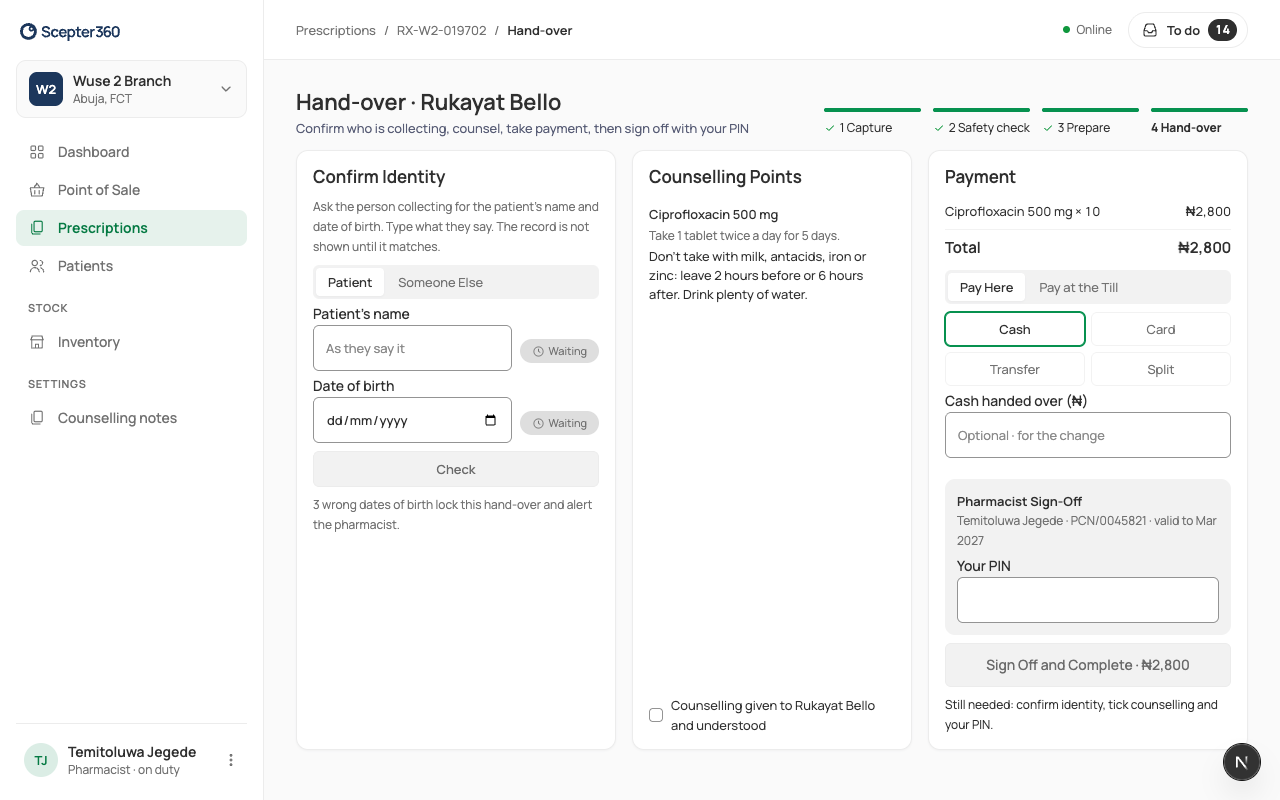
The line under the buttons says what's still needed, for example "Still needed: confirm identity, tick counselling and your PIN."
Paying at the till
At the till, Prescriptions to pay shows how many are waiting. Choose Add to Sale: the lines are set by the pharmacist and can't be changed or discounted. Then take payment as usual.
If something goes wrong
- "This till has no open shift. …" Open the till's shift first, or choose Pay at the Till.
- "Waiting for payment at the till. …" The till hasn't taken it yet. Take Back cancels the till payment so you can take it here.