
Appearance
Go on duty as pharmacist
In short
When you arrive, choose Sign On as Pharmacist on the banner, tick that you're here, and choose Sign On. Prescriptions and controlled drugs are locked at a branch until a pharmacist is on duty.
Who: pharmacists (and the owner, if they're a pharmacist) with a PCN licence on record that hasn't expired.
Why it matters
While nobody is on duty, every page shows No pharmacist on duty: "Prescription dispensing and controlled-drug movements are locked at this branch. Over-the-counter sales can continue."
Sign on
- On the No pharmacist on duty banner, choose Sign On as Pharmacist.
- Check the details: your name, your PCN licence (it must say "Valid to …"), the branch, and Shift: From now until you sign off.
- Tick I am physically present at this branch and responsible for dispensing.
- Choose Sign On.
You see "You’re on duty", and your name shows "on duty" at the bottom of the menu.
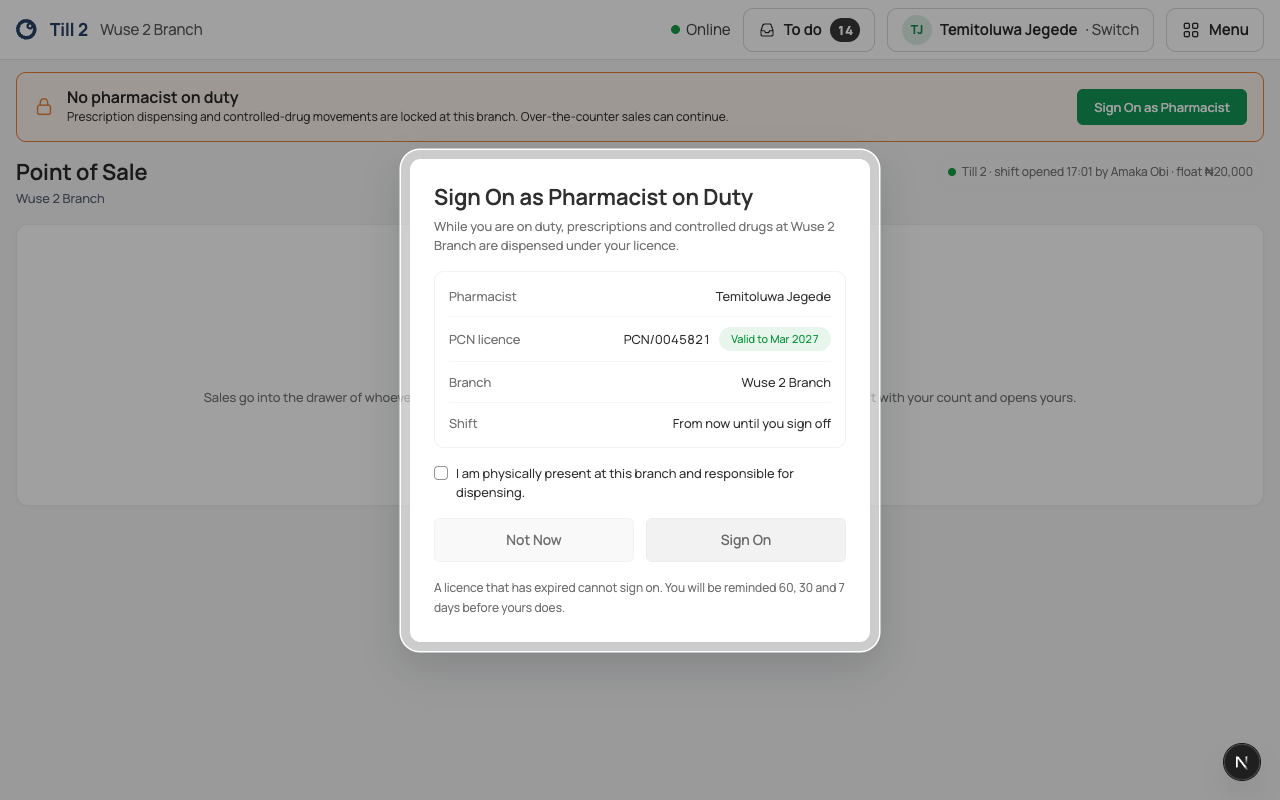
If another pharmacist was on duty, you take over from them.
Going off duty
You come off duty when you Log out, when another pharmacist signs on, after 30 minutes without using Scepter360, or when the branch closes for the day. To step away for a moment, use Switch (or Switch user) instead of logging out.
If something goes wrong
- The Sign On button stays grey: tick the box, and check your licence shows as valid.
- "Your licence has expired, so you can’t sign on." Renew it with the PCN, then ask your superintendent to update it in Scepter360.
- "Your PCN licence hasn’t been confirmed yet. Ask the owner to check it before signing on duty." Ask your owner to confirm it.
- "Only a pharmacist with a PCN licence on record can sign on." Your licence isn't on your staff record. Ask your owner to add it.
Scepter360 reminds you 60, 30 and 7 days before your licence expires.