
Appearance
Sign off the day
In short
After the last till closes, open End of Day: check the tills, look at anything flagged, enter what goes to the bank, and choose Sign Off the Day.
Who: owners and branch managers. Needs internet.
Sign off
- Open End of Day. It shows today; pick another Day to look back.
- Glance at the totals: Sales, Transactions, Prescriptions Filled, Refunds.
- Check the Tills: look at the difference column first. Every till must be closed ("all tills closed").
- Read Needs a Look: it gathers what deserves a second glance, such as tills left open or closed remotely, cash differences, discounts and refunds that needed approval, and offline clashes. Several differences or refunds on one till are worth asking about.
- Under Cash to Bank, the card works out To the bank: the cash counted in the tills, less the floats kept for tomorrow. Enter the Amount Banked (₦), Deposit Slip, Floats Kept (₦) and a Note for the owner if needed.
- Choose Sign Off the Day.
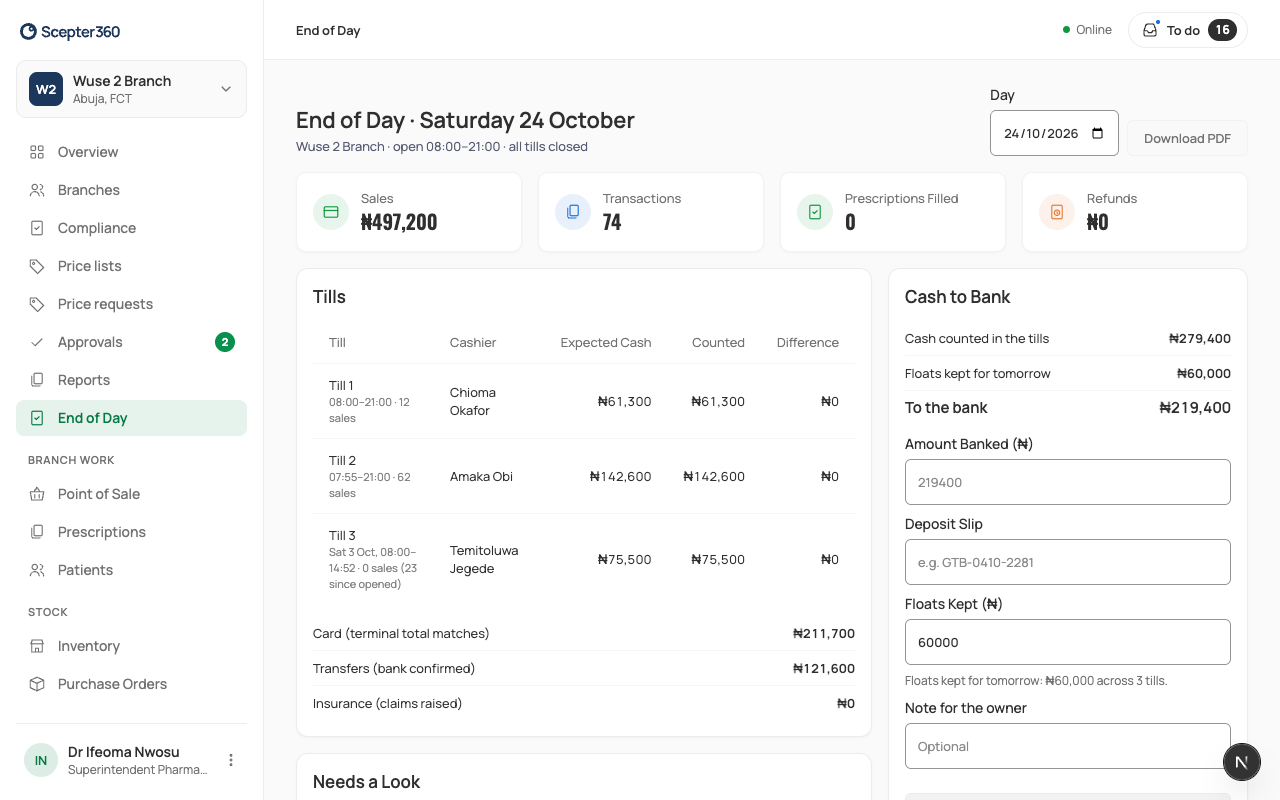
It then shows "Signed off by … at …". Download PDF prints the day.
If something goes wrong
- "Close every till before signing off the day." A till is still open. Close it at the till, or remotely from Tills.
- "You’re offline. Signing off needs a connection."