
Appearance
Price lists
In short
With one price list, every branch sells at the same prices. If some branches should charge differently (an airport or hospital branch, say), add a price list for them: copy your prices, change them by a percentage, and choose the branches. They switch at opening the next day.
Who: the owner. Settings › Price lists.
See your lists
Each list shows the branches that use it, how many products it prices, and its last change. Standard prices is the default for new branches.
Add a price list
- Choose Add a price list.
- Type its Name, for example "Premium branches".
- Start from: the list to copy, usually Copy Standard prices.
- Change all prices by: a whole percentage, like +10 or −5. Prices round to the nearest ₦10. You can change single products afterwards.
- Tick the Branches that use it. The others stay on their list; each branch uses one list.
- Choose Add price list.
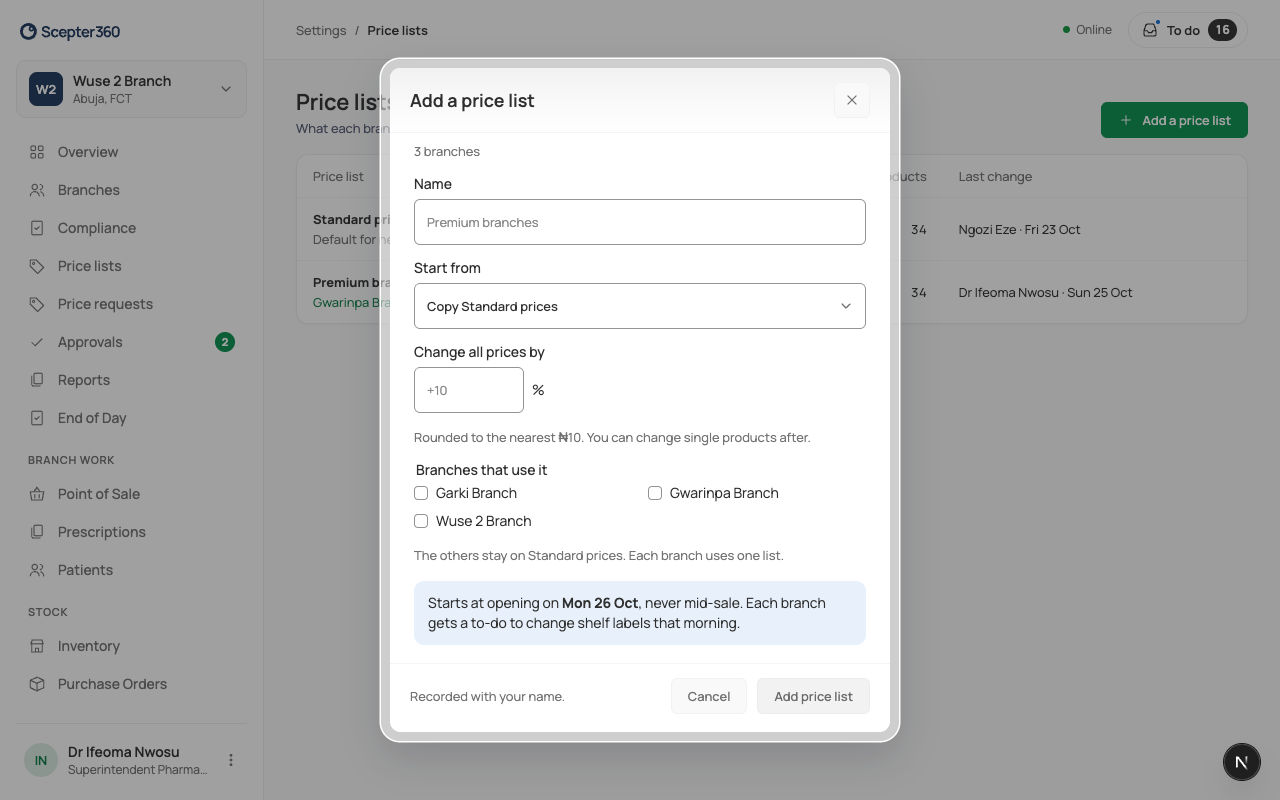
The branches switch at their opening the next day, never in the middle of a sale. That morning, each gets a to-do to change its shelf labels.
With two or more lists
Price lists (a table of every product's price on each list) and Price requests appear in your menu. From Price lists you can Schedule a price change.
Chains
A business with areas gives lists to regions instead, on Price lists.