
Appearance
Your overview
In short
Overview (owners) or Dashboard (branch managers) is where your day starts: how the branch is doing, and Needs you, the things waiting for you.
Who: owners and branch managers.
The owner's overview
Open Overview. You see your branch's day:
- Sales, compared with usual (switch Today, This week or This month).
- Prescriptions waiting now, and how long the oldest has waited.
- Gross margin, if you see costs.
- Cash in tills: how many tills are open.
- Needs you: to-dos and urgent things, such as "No pharmacist on duty at Wuse 2 Branch". Choose See all for your whole To do.
- How the branch is doing: pharmacist on duty, fridges, controlled-drug count, stock counts and licences.
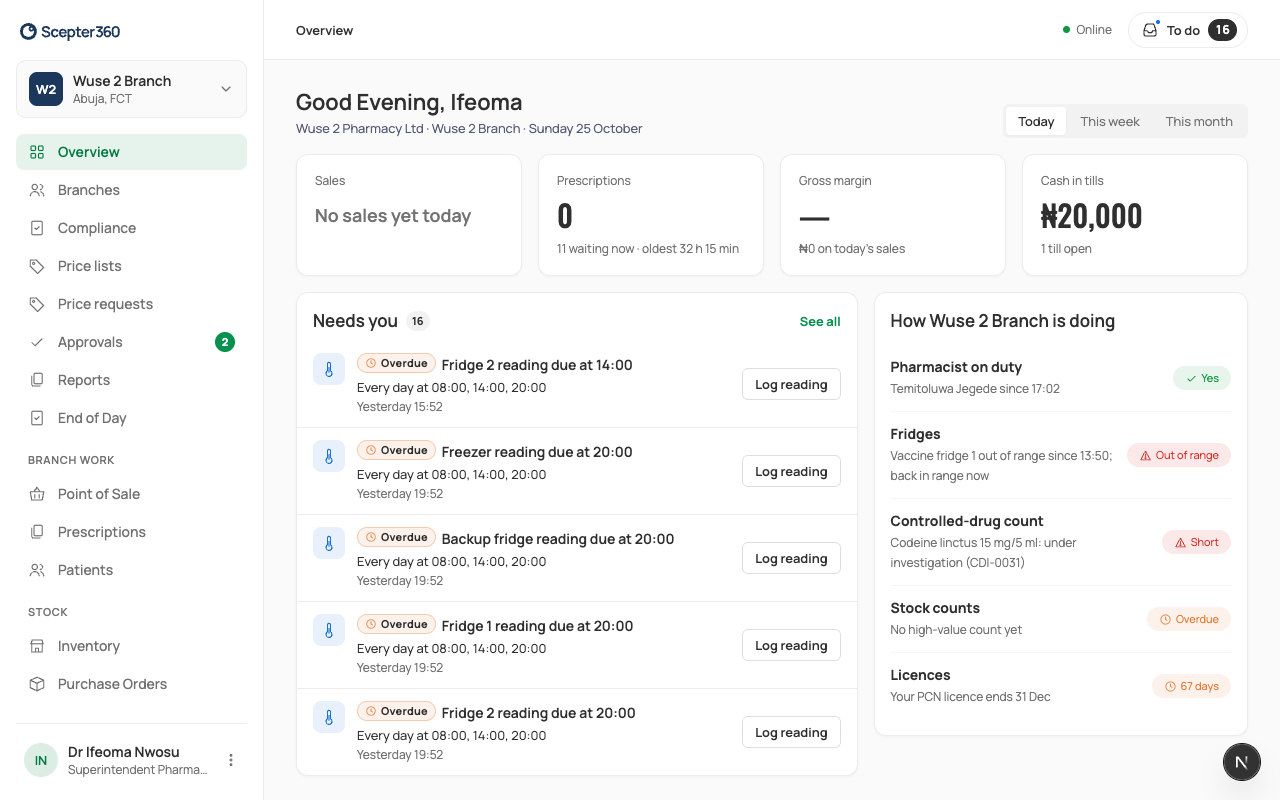
With more than one branch, choose All branches from the branch menu at the top of the menu to see them together: see The overview.
If you're offline, the overview shows the figures from the last time it updated.
Before you go live
Until your first branch is live, the overview shows Finish setting up to go live: each step, whose turn it is (Your turn, Waiting for Arrowhead, Booked), and your Arrowhead contact. See Set up your business and branches.
The branch manager's dashboard
Open Dashboard: Expiring in 30 Days, and Needs you with your to-dos.