
Appearance
Fridges and temperatures
In short
Record each fridge's reading at its times, with a photo of the thermometer and your PIN. If a fridge goes out of range, acknowledge it, move the stock, and a pharmacist decides what's safe.
Who: everyone records readings. Assessing stock after an excursion needs a pharmacist (or the owner).
Record a reading
- In Inventory, choose Temperature Log, and open the fridge.
- Under Record Reading, type Now °C, Min °C and Max °C, and add the photo. Min and max show whether it left the range since the last reading, even if it's fine now.
- If you're more than 15 minutes late, say why. A missed reading is a gap in the cold-chain record, and stays marked late on the inspection printout.
- Type your PIN and choose Save Reading.
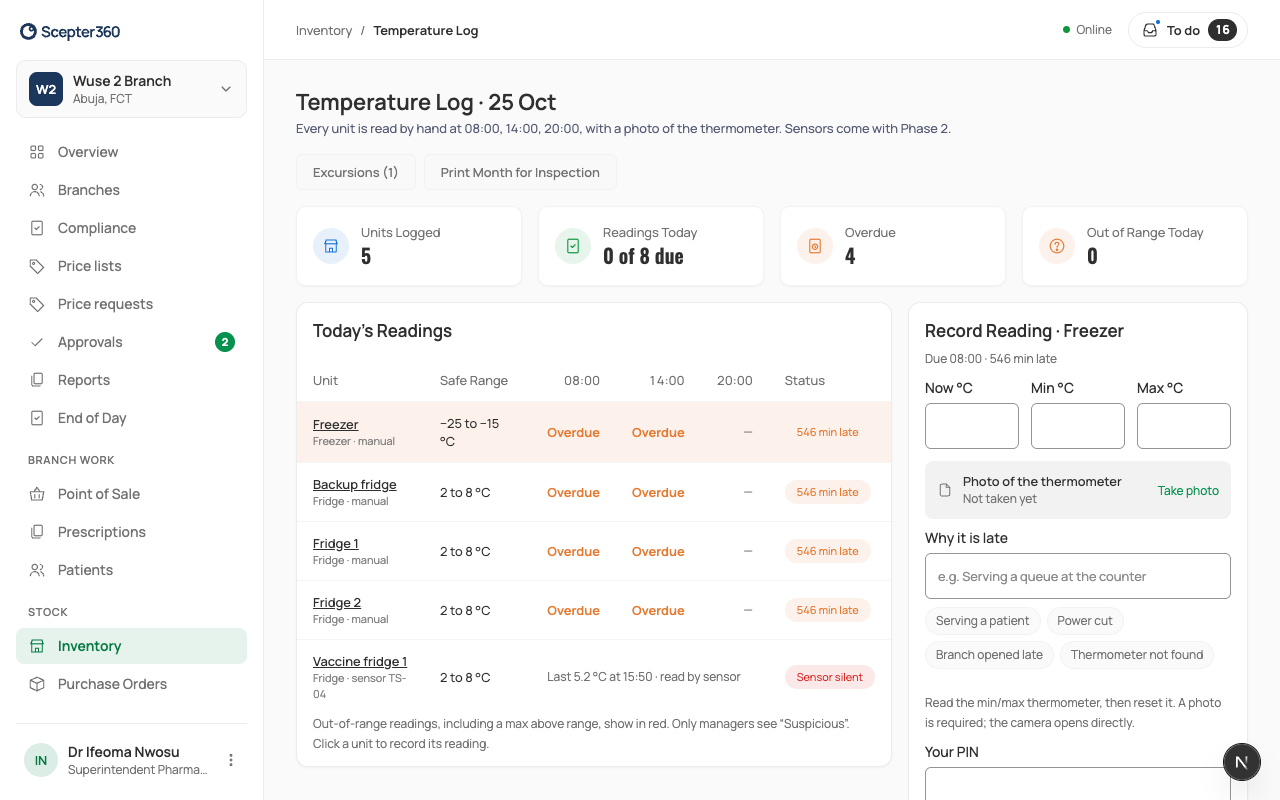
Print Month for Inspection prints the month's log.
When a fridge goes out of range
You get an urgent to-do. Open it:
- Acknowledge it.
- Move the stock somewhere safe and choose Record Moved.
- A pharmacist chooses Start Assessment and decides for each batch: Release, Restrict (a new use-by date), Destroy or Quarantine, then signs with their PIN. The guidance shown comes from the product record; how long it was out of range, and how far, usually decides it.
A fridge sensor that stops sending also raises an urgent to-do: check it and Record Manual Reading.