
Appearance
Tills
In short
A till is a tablet or computer registered to a branch: only tills can sell. Register it on the device itself, give it a name, and remove it if it's lost or replaced.
Who: the owner and branch managers.
Register a till
Do this on the device that will be the till.
- Sign in on it, and open Tills (owners: More settings › Tills).
- Choose Register This Device, pick the Branch, and type a Till name like "Till 3".
- Save. "This device is now Till 3."
From now on it locks when idle, staff unlock it with their PIN, and it can sell offline. Selling waits until the branch is live.
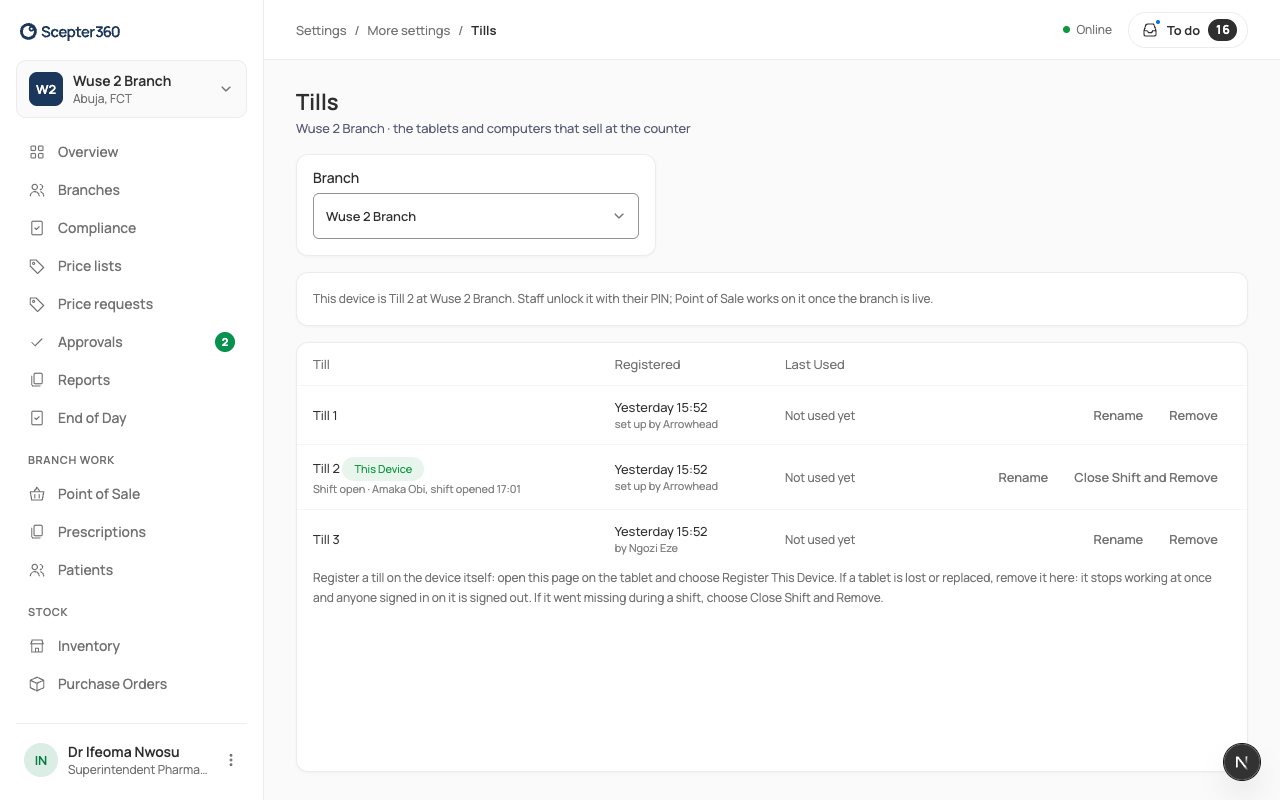
Rename or remove a till
On Tills, choose Rename or Remove next to it. A removed till stops working at once, so remove a lost or stolen till straight away.
A lost till with a shift still open
Choose Close Shift and Remove. Enter what you know (cash found, card, transfer) and What happened, and who counted. If the difference is over the limit, another manager approves with their PIN. Tick Also remove this till if it's gone for good, and confirm. End of Day shows it as "closed remotely".
If something goes wrong
- "This branch already has a till called …": pick another name.
- The browser was cleared or the app reinstalled: the device forgets it's a till. Remove the old entry and register it again.