
Appearance
Roles and limits
In short
Roles shows what each role may do, and their limits (discounts, refunds, orders). The owner can change them; the changes apply to everyone in that role.
Who: the owner changes them; branch managers can look.
- Open Staff and roles, then Roles (or More settings › Roles).
- Tick or untick what each role may do. Some are fixed (only licensed pharmacists dispense; the owner keeps every permission).
- Set the limits: a cashier's discount (% or ₦), a pharmacist's refund, a manager's purchase order, and others. Leave a limit empty for no limit. Anything over a limit waits for someone who can approve it: set too low, staff wait more; too high, and less gets checked.
- Choose Save Changes.
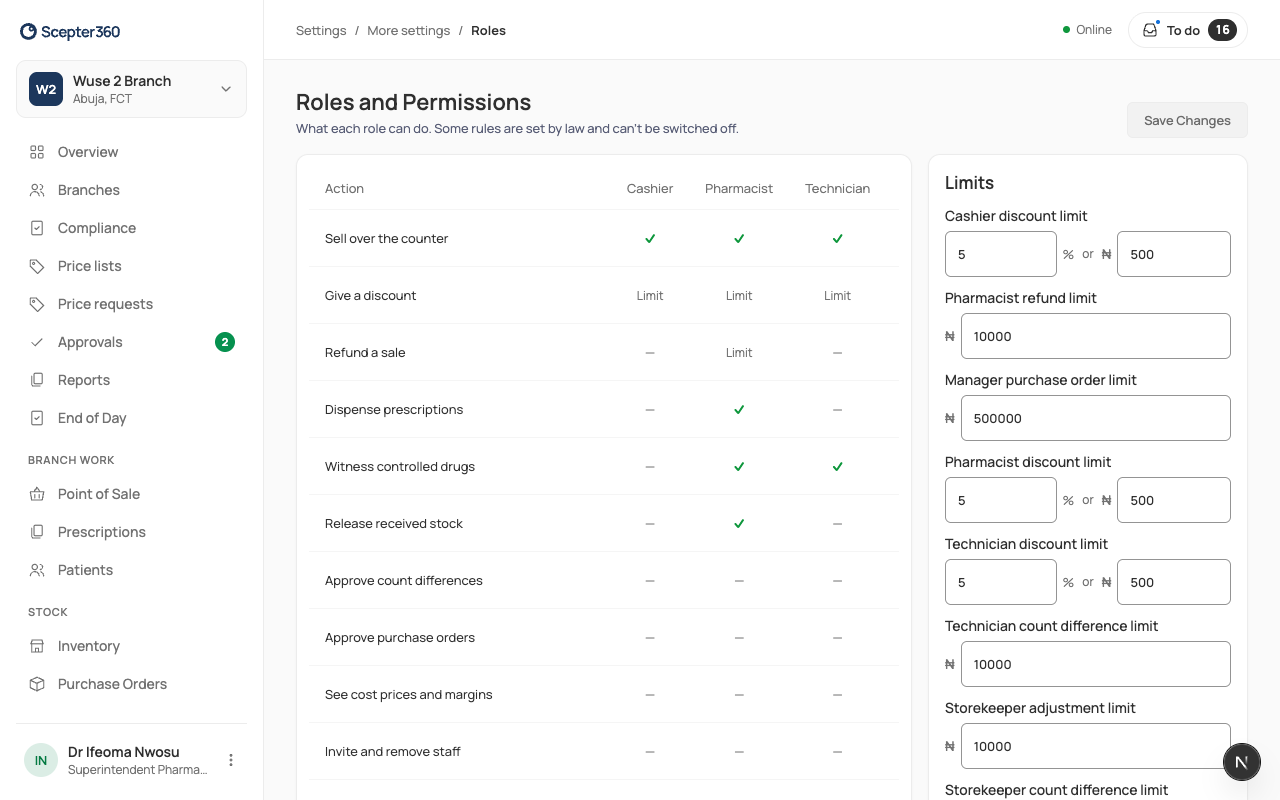
The default limits: discounts 5% or ₦500 a sale for counter staff; refunds ₦10,000 for pharmacists; purchase orders ₦500,000 for managers and buyers; stock adjustments and count differences ₦10,000 for storekeepers (count differences for technicians too).