
Appearance
Expiring stock
In short
Expiring Stock shows what expires in the next 30, 60 or 90 days, and what to do about each batch: sell it first, return it to the supplier, or destroy it.
Who: everyone can look; acting needs the right permission.
See what's expiring
In Inventory, choose Expiring Stock, then 30, 60 or 90 days. Each batch shows when it expires, how many, their value, and a Suggested Action, worked out from how fast it sells here and the days left:
- Sell first: at its usual pace, it sells out before it expires.
- Return to supplier for credit: the supplier takes returns. Choose Start (return stock).
- Destroy with a witness: it's expired or blocked, and the supplier doesn't take returns. Choose Start (destroy stock).
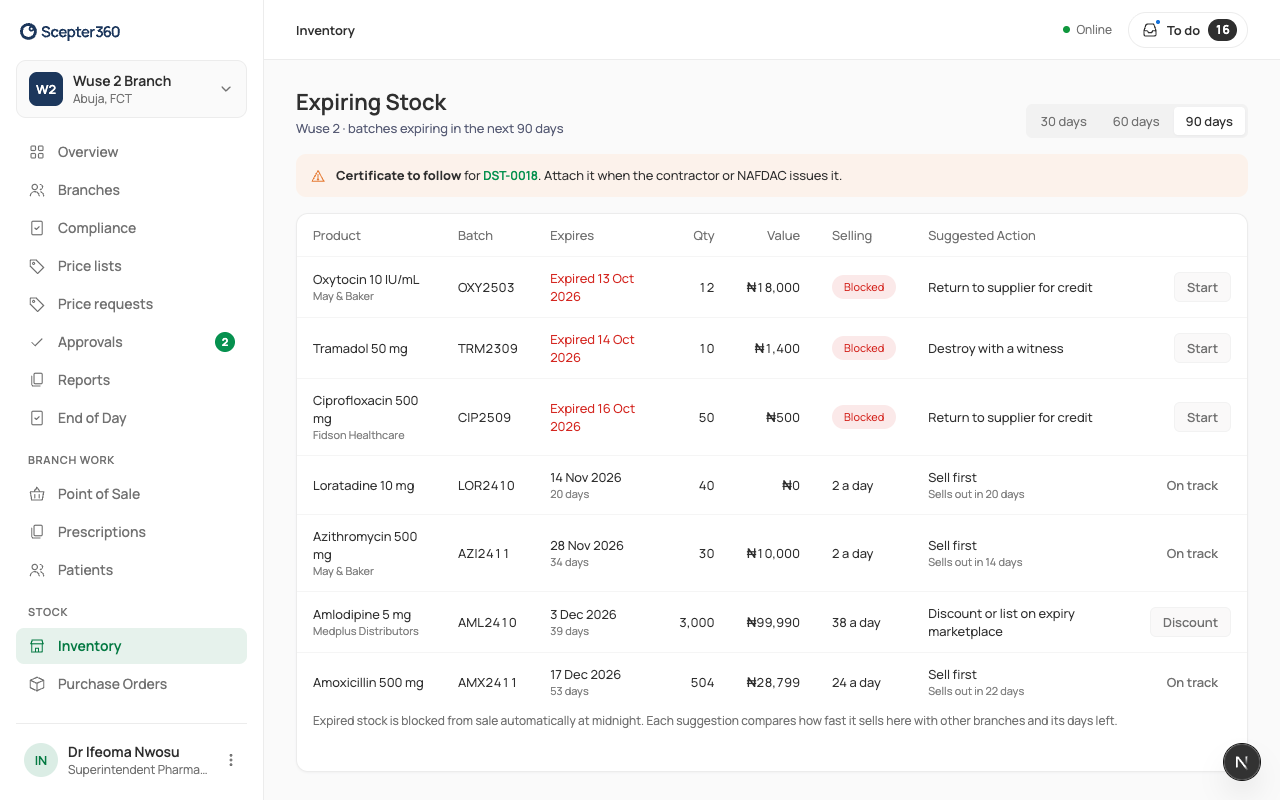
Expired stock is blocked from sale automatically at midnight.